.\
cgsymbol.pro
Routines
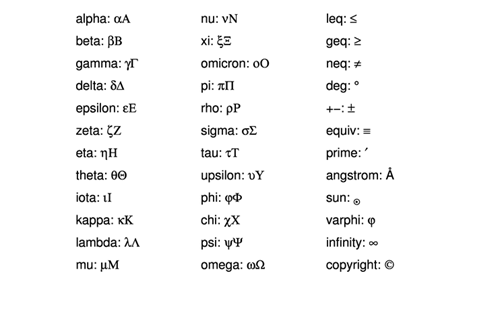
cgSymbol_Example [, /PS] [, /UNICODE]This function provides a device-independent way to ask for commonly-used symbols (e.g., less than or equal to, Angstrom, degree symbol, subscripts, superscripts, etc.), including all 24 Greek symbols in upper and lower case, to display with text.
result = cgSymbol(symbol [, /CAPITAL] [, /EXAMPLE] [, /PS] [, /UNICODE])This function provides a device-independent way to ask for commonly-used symbols (e.g., less than or equal to, Angstrom, degree symbol, etc.), including all 24 Greek symbols in upper and lower case, to display with text.
Routine details
top cgSymbol_Example
Graphics
cgSymbol_Example [, /PS] [, /UNICODE]
This function provides a device-independent way to ask for commonly-used symbols (e.g., less than or equal to, Angstrom, degree symbol, subscripts, superscripts, etc.), including all 24 Greek symbols in upper and lower case, to display with text.
For this program to work correctly on your graphics display, you should be using Hershey fonts (!P.Font=-1). It will work correctly in PostScript with either hardware fonts (!P.Font=0) or True-Type fonts (!P.Font=1).
Greek Symbols are created by calling the Coyote Library routine cgGreek from this program.
Normally, rather than calling cgSymbol, the symbols are embedded in Coyote Graphics
text that are used for axis annotation and so forth. See Embedding Symbols in Coyote
Graphics Output <http://www.idlcoyote.com/cg_tips/embedsymbols.php>. Embedded subscripts
and superscripts are implemented like this:
   $\upTEXT$ : Raise the text in TEXT to superscript level and reduce character size by 62%.
   $\expTEXT$ : Raise the text in TEXT to superscript level and reduce character size by 44%.
   $\downTEXT$ : Lower the text in TEXT to subscript level and reduce character size by 62%.
   $\subTEXT$ : Lower the text in TEXT to subscript level and reduce character size by 44%.
Keywords
- PS in optional type=boolean default=0
Normally, the PostScript version of the symbol is returned automatically if the current device is PostScript and !P.Font is 0 or 1. But, the PostScript version of the symbol can be obtained at any time and in any device, by setting this keyword.
- UNICODE in optional type=boolean default=0
If this keyword is set, the function returns the Unicode value for the symbol.
Examples
To create a lowercase Greek psi symbol:
  IDL> cgPlot, findgen(11), XTitle='This title contains ' + $
           cgSymbol('psi') + ' as a Greek letter'
  IDL> cgPlot, findgen(11), XTitle='This title contains $\psi$ as a Greek letter'
  IDL> cgPlot, findgen(11), XTitle='This title contains (' + $
          cgSymbol('Angstrom') +  ') an Angstrom sign.'
  IDL> cgPlot, findgen(11), XTitle='This title contains ($\Angstrom$) an Angstrom sign.'
  IDL> cgPlot, findgen(11), XTitle='E=mc$\up2$'
  IDL> cgPlot, findgen(11), XTitle='H$\sub2$O'
  IDL> cgPlot, findgen(11), XTitle='H$\upSuper$MT $\Omega$$\subSubscript$', Charsize=2.0
IDL> cgPlot, cgDemoData(1), XTitle='$\Omega$$\exp\\lambda$', Charsize=2.0
IDL> cgPlot, cgDemoData(1), XTitle='$\Omega$$\sub\\lambda$', Charsize=2.0
   IDL> cgSet_TTFont, 'dejavusans'
   IDL> cgPlot, cgDemoData(1), XTitle='R$\sub\\sun$', Charsize=2.0, Output='test.png'
Author information
- Author:
FANNING SOFTWARE CONSULTING:
David W. Fanning 1645 Sheely Drive Fort Collins, CO 80526 USA Phone: 970-221-0438 E-mail: david@idlcoyote.com Coyote's Guide to IDL Programming: http://www.idlcoyote.com- Copyright:
Copyright (c) 2011, Fanning Software Consulting, Inc. Displays the symbols and their names in a graphics window.
- History:
Change History:
  Written by: David W. Fanning, 2 September 2011.
  Added plus-minus symbol. 2 Nov 2011. DWF.
  Added "up", "down", "exp" "sub" and "n" symbols for subscripting and superscripting. 9 Nov 2012. DWF.
  Added "division" and "times" signs. 24 Nov 2012. DWF.
  Updated UNICODE values to display capital letters correctly. 23 Dec 2012. DWF.
  Change to allow for astronomically correct Sun symbol in DejaVuSans font when in the PostScript
      device, using True-Type fonts. 5 Dec 2014. DWF.
top cgSymbol
result = cgSymbol(symbol [, /CAPITAL] [, /EXAMPLE] [, /PS] [, /UNICODE])
This function provides a device-independent way to ask for commonly-used symbols (e.g., less than or equal to, Angstrom, degree symbol, etc.), including all 24 Greek symbols in upper and lower case, to display with text.
Parameters
- symbol in required type=string default=alpha
The name of the symbol desired as a string. Valid string names are the 24 characters of the Greek alphabet, plus commonly used graphical symbols:
Note that if the first letter of the name is capitalized, this is the equivalent of setting thealpha nu leq beta xi geq gamma omicron neg delta pi deg epsilon rho equiv zeta sigma prime eta tau angstrom theta upsilon sun iota phi varphi kappa chi infinity lambda psi copyright mu omegaCapitalkeyword. Only Greek characters use this method of selecting symbols.
Keywords
- CAPITAL in optional type=boolean default=0
If this keyword is set, the captial Greek letter is returned rather than the lowercase Greek letter. An alternative way of capitalizing the letter is to make the first letter of the name an uppercase letter.
- EXAMPLE in optional type=boolean default=0
If this keyword is set, the names of symbols and the symbols themselves are written out in the current graphics window.
- PS in optional type=boolean default=0
Normally, the PostScript version of the symbol is returned automatically if the current device is PostScript and !P.Font is 0 or 1. But, the PostScript version of the symbol can be obtained at any time and in any device, by setting this keyword.
- UNICODE in optional type=boolean default=0
If this keyword is set, the function returns the Unicode value for the symbol.
File attributes
| Modification date: | Fri Mar 27 11:07:39 2015 |
| Lines: | 439 |
| Docformat: | rst rst |