Coyote Library Utility Programs
The utility programs perform a variety of useful tasks for other programs in the Coyote Library. As such, they really belong in almost every category of programs.
- ADJUSTPOSITION Allows interactive adjustment of the plot position in a graphics windows.
- ARCSAMPLE Resamples a closed curve on approximately equally-spaced arc distances.
- BELL Windows-only set of programs for ringing the bell (or playing a sound).
- BINARY Used to print a binary representation of an integer.
- BITGET Returns the value of a specified bit in a number.
- CAPFIRSTLETTER A utility program that capitalizes the first letter of each word in a string.
- cgADDTOPATH Allows the user to add a directory to the IDL !PATH system variable.
- cgAPPENDTOFILENAME Appends a string to the root name of a longer file name.
- cgCENTERTLB Centers a widget program on the display.
- cgDEMODATA Opens data files found in the IDL distribution.
- cgDBLTOSTR Converts a double precision value to a string in a way that preserves significant digits.
- cgFIXPS Fixes IDL PostScript landscape output files so they display with proper orientation.
- cgGREEK Returns a letter from the Greek alphabet as a string for plot annotation.
- cgNUMBER_FORMATTER A utility routine to format numbers used in text widgets.
- cgPICKFILE A wrapper for Dialog_Pickfile that remembers your last selection.
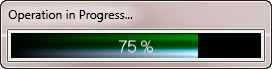
- cgPROGRESSBAR Implements a "show progress" bar.
- cgRANDOMINDICES Create random indices without replacement (unique indices).
- cgRANDOMWALD Create random indices with Inverse Gaussian or Wald distribution.
- cgRESIZEIMAGE A Congrid command without Congrid's weaknesses for resizing images.
- cgREVERSEINDICES A routine read the histogram reverse indices vector in a simple way.
- cgROOTNAME Return the base or root of the filename, the directory name, and the file extension as strings.
- cgSCALEVECTOR Scales vector or array between given MIN and MAX values.
- cgSETDIFFERENCE Finds the difference between two sets of integer values.
- cgcSETINTERSECTION Finds the intersection between two sets of integer values.
- cgSETUNION Finds the union between two sets of integer values.
- CLIPBOARD Copies contents of an IDL graphics window to clipboard for pasting to other applications.
- CONVERT_TO_TYPE A function that converts its input argument to a run-time data type.
- COUNT_ROWS Count the number of rows in an ASCII file.
- DECOMPOSEDCOLOR Determines if graphics device supports decomposed color.
- ERRORLOGGER An object for logging program errors and other comments.
- ERROR_MESSAGE A device-independent error handler with traceback capability.
- FIND_RESOURCE_FILE Returns a fully-qualified path to a resource file.
- FLOATS_EQUAL Compares two floating-point values or arrays for equality.
- FPUFIX Fixes problems in data that can cause floating point underflow errors.
- GEOCOORD Converts a GEOTIFF structure to a MAPCOORD map coordinate object.
- GETDECOMPOSEDSTATE Returns a device/version independent current decomposition state.
- GET_OBJECT_ID Obtain a unique object identifier for an object.
- GRIDPOSITIONS Calculate column and row grid positions anywhere in the window.
- HELP_VAR Performs a "HELP" on variables only.
- IDLWAVE_CATALOG Catalog file of this library for the IDLWAVE Emacs mode.
- IMAGE_DIMENSIONS Utility for determining the size and dimensions of images.
- INSIDE Tests if point is inside a specified polygon.
- JD2TIME Converts a Julian Day Number into a well-formatted time string.
- LEFTJUSTIFY Creates a string that is left justified with respect to a string width.
- LINKEDLIST Implements a doubly linked list.
- LIST_SELECTOR A pop-up dialog widget for selecting items from a string array.
- MAXWINDOWSIZE Returns the maximum size of an unobstructed graphics window.
- MAXMIN Print the maximum and minimum of a variable.
- NAME_SELECTOR A pop-up dialog widget for selecting items from a string array.
- PRINTWINDOW Utility for sending the contents of a graphics window to the printer.
- PROGRAMROOTDIR Utility for specifying relative filepaths in IDL program distributions.
- RANDOMNUMBERGENERATOR An object for creating random numbers.
- RANGEOF A utility program for finding the range of a vector or array.
- REPMAT Replicates or tiles a matrix in a manner similar to MatLab RepMat command.
- RESOLVE_OBJECT Restores an object's methods when a saved object is restored.
- SAVETOMAIN Saves a variable to the main IDL level from within a procedure.
- SCROLLWINDOW A scrollable window when display size is smaller than window size.
- SETDECOMPOSEDSTATE Sets a device/version independent current decomposition state.
- SETDEFAULTVALUE Sets default values for positional and keyword arguments.
- SORT_ND Efficiently perform an N-dimensional sort along any dimension of an array.
- STR_SIZE Calculates character size for direct graphics resizeable graphics windows.
- TEXTLINEFORMAT Formats a long line of text into a string array of specified maximum length.
- TRANSFORM_VOLUME Allows efficient rotation, scaling, and transformation of 3D array or volume data.
- UNDEFINE Deletes program variables at any program level, including at the IDL command line.
- WINDOWAVAILABLE Indicates whether a graphics window is currently open and available.
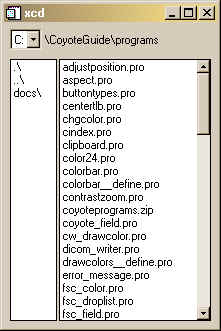
- XCD Fancy change directory utility. Couldn't live without it. :-)
![]()
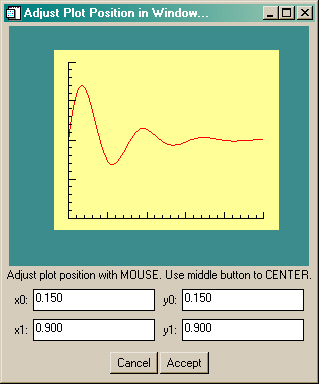
ADJUSTPOSITION | |
This utility program allows the user to interactively adjust the plot
position coordinates by resizing and moving a plot representation in a window.
The return value from this function can be used to position almost any IDL graphic
in a graphics window via the Position keyword. This program requires
FSC_Field and
FSC_PlotWindow
from the Coyote program library.
![]() |
ARCSAMPLE | |
| This small utility program re-samples a closed curve with a specified number of points at approximately equally-spaced arc intervals. I've had occasion to use it in a number of different (and strange) applications, so I've become convinced it is generally useful. :-) |
BELL | |
| This is a Windows-only set of programs for ringing the bell (or--more generally--for playing a sound on Windows machines. Standard sounds (ding, bells, chimes, etc.) are available in your Windows installation. More interesting (and fun) sounds are provided with the Bell program. |
BINARY | |
| This small utility program is used to print a binary representation of an integer. See Converting Between 8-Bit and 24-Bit Numbers for more information on how it can be used. |
BITGET | |
| This utility routine returns the bit value (0 or 1) of a specified bit in a number. |
CAPFIRSTLETTER | |
| This utility routine simply capitalizes the first letter in each word of a given string. All other letters are set to lowercase. |
cgREVERSEINDICES | |
Given the reverse indices vector obtained from the Histogram command and an index number, this
routine will return the indices as a result of the function. A COUNT keyword will tell you how
many indices are available. The function makes it much easier to use the reverse indices vector.
IDL> h = Histogram(cgDemoData(7), REVERSE_INDICES=ri) IDL> bin5Indices = cgReverseIndices(ri, 5, COUNT=count) |
cgSCALEVECTOR | |
| This simple utility routine allows you to scale all the points in a vector between a minimum and maximun value. The minimum value of the vector (or array) is set equal to the minimun data range. And the maximun value of the vector (or array) is set equal to the maximun data range. The program is useful for scaling latitude and longitude vectors for contour plots on map projections, for example. |
cgSETDIFFERENCE | |
This utility program finds the difference between two sets of integers. In other words,
it return the integers that are found in set A, but are missing from set B.
IDL> set_a = [1,2,3,4,5]
IDL> set_b = [4,5,6,7,8,9,10,11]
IDL> Print, cgSetDifference(set_a, set_b)
1 2 3
|
cgSETINTERSECTION | |
This utility program finds the intersection between two sets of integers. In other words,
it return the integers that are found in both set A and set B.
IDL> set_a = [1,2,3,4,5]
IDL> set_b = [4,5,6,7,8,9,10,11]
IDL> Print, cgSetIntersection(set_a, set_b)
4 5
|
cgSETUNION | |
This utility program finds the union between two sets of integers. In other words,
it return the integers that are found in set A and set B combined.
IDL> set_a = [1,2,3,4,5]
IDL> set_b = [4,5,6,7,8,9,10,11]
IDL> Print, cgSetUnion(set_a, set_b)
1 2 3 4 5 6 7 8 9 10 11
|
CLIPBOARD | |
| This utility routine copies the contents of an IDL graphics window to the clipboard for subsequent pasting into other applications. I've successfully pasted IDL graphics windows into Framemaker, Powerpoint, Photoshop, Excel, and Word documents. |
CONVERT_TO_TYPE | |
| This utility program allows the user to convert input to a particular data type at run-time. It is particularly useful in preserving the data type of input data that needs to be scaled or otherwise manipulated in a data type other than its native type. |
COUNT_ROWS | |
| Counts the number of rows in an ASCII file. Replaced by FILE_LINES in IDL 5.6. |
DECOMPOSEDCOLOR | |
| This function provides a device-independent way to determine if a graphics device is currently set to use decomposed color (sometimes known as true-color) or to use indexed color. The program was mandated by the introduction of PostScript 24-bit decomposed color in IDL 7.1 without any way to determine programmatically if the PostScript device was currently in 24-bit color mode. The program works identically with WIN, X, MAC, Z, and PS devices, as well as others. |
ERRORLOGGER | |
| The purpose of this utility routine is to be able to log program errors and other textual messages to a log file during program execution. User alerts can be issued and program status monitored via methods to this object. Text can be added to the logger while simultaneously being printed in the IDL console window. |
ERROR_MESSAGE | |
| The purpose of this utility routine is to have a device-independent way to create error messages. I like to write programs that use Dialog_Message to report errors to the user. But, of course, these error message don't work if I'm in the PostScript device rather than the X device. This program gives me the ability to write one error message and have it work appropriately for the device it is running on. Moreover, a Traceback keyword will give me accurate traceback information if this is used in conjunction with a Catch error handler. |
FIND_BOUNDARY | |
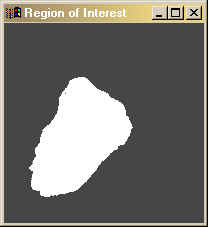
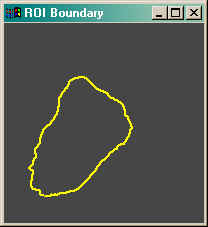
The purpose of this utility routine is to find the pixel boundary (or contour, if you
like) about a region of interest in an image. The region of interest is given as a one-dimensional
vector of image indices, such as those that are returned from the Where function. Optional
keywords allow you to return the perimeter length and the area enclosed within the boundary as well.
The program uses a chain-code algorithm for calculaing the boundary pixels.
![]() ![]() |
FIND_RESOURCE_FILE | |
| This utility program will find and return a fully-qualified path to a resource file. It will look in likely places to find the file first, then search the entire IDL path for such a file. I find it a big help in distributing applications that require resource files such as bitmaps for buttons, special color table files, or data files for vector overlays, etc. |
FLOATS_EQUAL | |
| This utility program compares to floating-point or double-precision values or arrays for equality. Arrays are equal if they contain the same number of elements, and each element is equal to the matching element in the other array. |
FPUFIX | |
| This utility program fixes problems with numerical data that might cause floating point underflow warning messages. Basically, values that are very close to zero (within the MACHAR XMIN limit) are set to zero. |
GEOCOORD | |
| This utility program converts a GeoTIFF structure containing geotags from a GeoTIFF image file (obtained by calling Query_TIFF or Read_TIFF), to a Catalyst Library map coordinate object, MapCoord. With the map coordinate object in hand, GeoTIFF images can be displayed in a completely georegistered form. Map overlays, annotation, and so forth can then be place on the image using latitude and longitude coordinates. |
GETDECOMPOSEDSTATE | |
This program returns the current color decomposition state of a graphics device in a device-independent and version-independent manner. |
GRIDPOSITIONS | |
| This program calculates column/row grid positions in a manner similar to !P.MULTI, except that the column and row grid can be located anywhere in the graphics window. This makes it easy to create display layouts with room for color bars and other graphical annotations. |
GET_OBJECT_ID | |
| This is a simple utility program that returns a unique string identifier for a heap variable (object or pointer). |
GRIDPOSITIONS | |
| This program calculates column/row grid positions in a manner similar to !P.MULTI, except that the column and row grid can be located anywhere in the graphics window. This makes it easy to create display layouts with room for color bars and other graphical annotations. |
HELP_VAR | |
| The purpose of this utility routine is to allow the user to display help for variables only, without the additional compiled procedures and functions given by the normal HELP command. It uses the undocumented and unsupported IDL routine Routine_Names, so it may not work for you. :-) |
IMAGE_DIMENSIONS | |
| The purpose of this utility routine is to have a simple way of obtaining the size and dimensions of both 8-bit and 24-bit images without a lot of fooling around. It is especially useful if you are writing device-independent image display routines. |
INSIDE | |
| This is a simple utility program that returns a 1 if a specified 2D point is inside a specified 2D polygon. The algorithm used is discussed in this article. |
JD2TIME | |
| This function converts a Julian Day Number (in the range 1 to 366) and a year into a well-formatted time string of the form 16 Mar 2008. Input can be a scalar or an array of Julian Day Numbers. |
LEFTJUSTIFY | |
This utility routine will left-justify a string with respect to a specified string width. Useful for aligning columns of text in text widgets. |
LINKEDLIST | |
| This program creates a doubly linked list object. The items stored in the list can be any type of IDL variable. Methods are available to add, delete, count, inquire about, and move list items from one location in the list to another. I like to use the linked list to implement a multiple UNDO or "history" feature in my programs. |
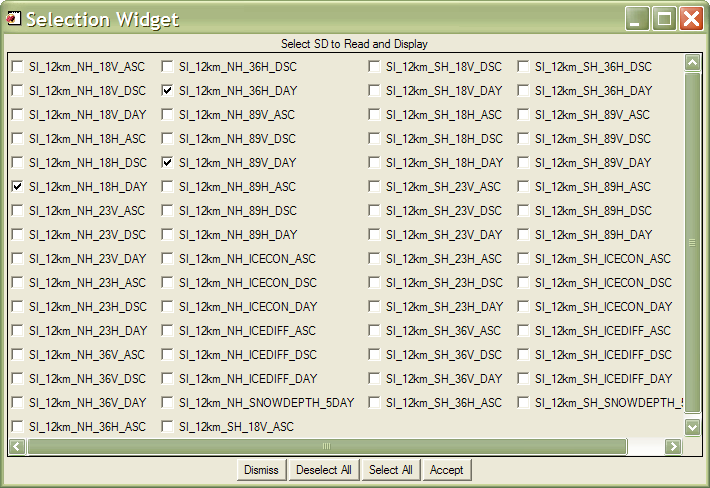
LIST_SELECTOR | |||||||||||||||||||||||||||||||||||||||||||||||||||||||||||||||||||||||||||||||||||||
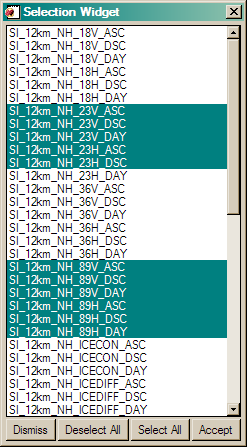
This utility routine is a pop-up dialog widget that allows the user to select one
or more "names" from a string array of names. I use it to give the user a list of scientific
data sets inside an HDF file. This program is similar to
Name_Selector, but I find it easier to use and
make selections when you have a large number of selections.
![]()
Version of IDL used to prepare this article: IDL 7.0.1.
Copyright ©
1996–2013 Fanning Software Consulting, Inc.
Last Updated: 21 March 2011
|